Understanding SC 2.5.1 Pointer Gestures (Level A)
In Brief
- Goal
- Let users operate touchscreens with one finger and reduced gestures.
- What to do
- Provide single-point operation for all functions.
- Why it's important
- Not everyone can perform complex and multi-touch gestures.
Success Criterion (SC)
All functionality that uses multipoint or path-based gestures for operation can be operated with a single pointer without a path-based gesture, unless a multipoint or path-based gesture is essential.
Note
This requirement applies to web content that interprets pointer actions (i.e., this does not apply to actions that are required to operate the user agent or assistive technology).
Intent
The intent of this success criterion is to ensure that content can be controlled with a range of pointing devices, abilities, and assistive technologies. Some people cannot perform gestures in a precise manner, or they may use a specialized or adapted input device such as a head pointer, eye-gaze system, or speech-controlled mouse emulator. Some pointing methods lack the capability or accuracy to perform multipoint or path-based gestures.
A path-based gesture involves an interaction where the movement of the pointer along a specific path matters. Examples of a path-based gesture include swiping/"flicking" (which is only recognized when the user moves in a mostly straight line from the start-point to the end-point), having to move a pointer strictly along a specific path, and other gestures which trace a prescribed path such as drawing a specific shape. Such paths may be drawn with a finger or stylus on a touchscreen, graphics tablet, or trackpad, or with a mouse, joystick, or similar pointer device.
For many gestures, the exact start- and end-points themselves are not relevant – what matters is that the overall gesture (mostly) follows a particular path. For instance, if a page implemented a horizontal "flick" gesture to move to the previous or next page, the exact point where the user starts the "flick" or ends it is irrelevant, as long as the "flick" gesture is horizontal, is of sufficient length, and is performed above a specific speed.
Examples of multipoint gestures include a two-finger pinch/spread zoom, a split tap where one finger rests on the screen and a second finger taps, or a two- or three-finger tap or swipe. Users may find it difficult or impossible to accomplish these if they type and point with a single finger or stick.
Authors must ensure that their content can be operated without multipoint or path-based gestures. Multipoint or path-based gestures can be used so long as the functionality can also be operated by another method, such as a tap, click, double tap, double click, long press, or click & hold.
An exception is made for functionality that is inherently and necessarily based on complex paths or multipoint gestures. For example, entering your signature may be inherently path-based (although acknowledging something or confirming your identity need not be).
This success criterion applies to gestures in the author-provided content, not gestures defined by the operating system, user agent, or assistive technology. Examples of operating system gestures on touchscreen devices would be swiping down from the top of the screen to see system notifications, and gestures to operate built-in assistive technologies. Examples of user agent-implemented gestures on touchscreen devices would be horizontal flicking motions implemented by browsers for navigating back or forward within the page history, or vertical flicking gestures to "fling" page content (or content inside natively scrollable containers) to scroll it. For assistive technology, examples include gestures used to operate a screen reader on a touchscreen device, such as swiping left or right to move the screen reader's cursor to the previous or next element.
This success criterion does not apply to gestures that involve dragging in any direction, not restricted or limited to a specific path. However, such gestures do require fine motor control. Authors are encouraged to provide non-dragging methods – for instance, a drag and drop operation could also be achieved by selecting an item (with a click/tap and keyboard interaction) and then selecting its destination as a second step. New in WCAG 2.2: These cases are covered in Success Criterion 2.5.7 Dragging Movements.
The difference between path-based Pointer Gestures and Dragging
In a path-based gesture, what matters is how the pointer moves: its path or direction (and sometimes its speed). For some gestures, even the exact start- and end-points may not matter.
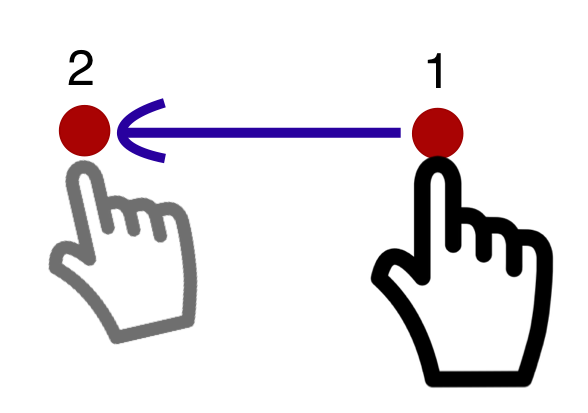
Figure 1. A path-based gesture where pointer movement is only recognized when it occurs in a straight line from the start-point to the end-point. If the user strays from the straight directional path, the gesture is not recognized, has no effect, or is cancelled.
Dragging movements, on the other hand, generally involve "picking up" or "grabbing" an object with a pointer (such as mouse cursor or a finger) and moving it to some other position.
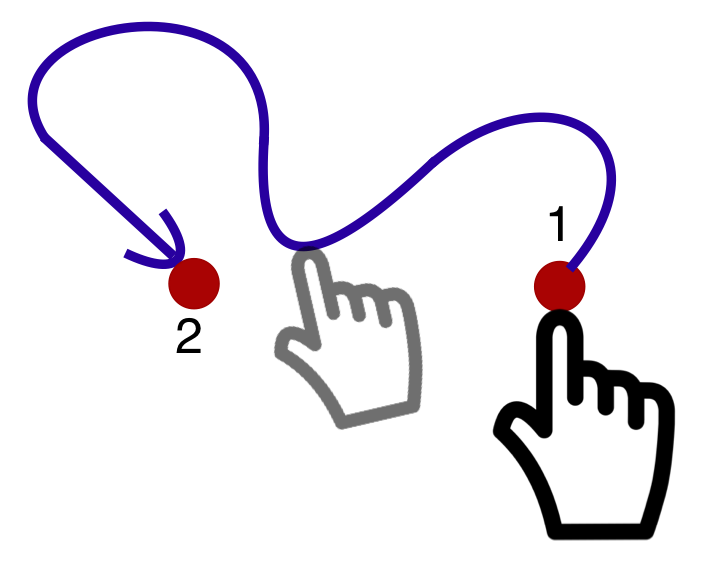
Figure 2. With a dragging gesture only the start- and end-point matter.
This type of movement from the start-point (where the object is first picked/grabbed) to the end-point (where it is dropped/released) that does not require the user to follow any particular path, direction, or speed, is therefore not a path-based gesture.

Figure 3. Example of a typical horizontal range slider.
While horizontal/vertical range sliders may initially appear to require strict path-based movement along their track, the vast majority of sliders (either provided natively by user agents, or implemented by the content using scripting) use "pointer capture" – once the user has "grabbed" a slider thumb, they can "drift" from the horizontal or vertical track of the slider while changing the value.
Unless the slider is implemented in a way that forces users to precisely follow the path of the track, and straying from the track "loses" the user's grip on the slider thumb, operating a slider is only considered a dragging movement, rather than a path-based gesture.
In the rare instances where a slider has been implemented in a way where straying from the track "loses" the user's grip on the slider thumb, it is considered to be both a dragging movement (as the action does involve grabbing the slider thumb, moving it, and then releasing it) and a path-based gesture at the same time. New in WCAG 2.2: In those cases, the slider may fail the requirements of both this criterion and Success Criterion 2.5.7 Dragging Movements.
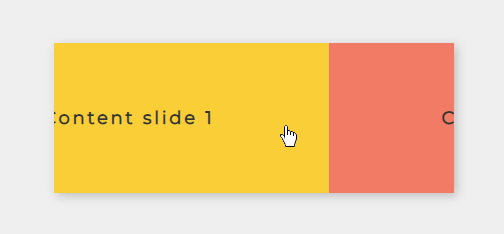
Figure 4. Example of a typical draggable content carousel.
The same rationale can be applied to components such as draggable carousels – these only count as requiring a path-based gesture if they expect the user to perform a precise movement along a path in order to move the content.
Relationship to keyboard accessibility requirements
While content authors generally need to provide keyboard operability as alternative for pointer operation, including complex gestures (see Success Criteria 2.1.1 Keyboard and 2.1.3 Keyboard (No Exception)), keyboard operability is not sufficient to conform to this success criterion. That is because some users rely entirely on pointing devices, or find simple pointer inputs much easier to perform and understand than alternatives. For example, a user relying on a head-pointer would find clicking a control to be much more convenient than activating an on-screen keyboard to emulate a keyboard shortcut, and a person who has difficulty memorizing a series of keys (or gestures) may find it much easier to simply click on a labeled control. Therefore, if one or more pointer-based mechanisms are supported, then their benefits should be afforded to users through simple, single-point actions alone.
Benefits
- Users who cannot (accurately) perform path-based pointer gestures - on a touchscreen, or with a mouse - will have alternative means for operating the content.
- Users who cannot perform multi-pointer gestures on a touchscreen (for instance, because they are operating the touchscreen with an alternative input such as a head pointer) will have a single-pointer alternative for operating the content.
- Users who may not understand the custom gesture interaction intended by the author will be able to rely on simple, frequently used gestures, such as basic clicking or tapping, to interact. This can be especially beneficial for users with cognitive or learning disabilities.
Examples
- A website includes a map view that supports the pinch/spread gesture to zoom into the map content. As a single-pointer alternative, the map also includes plus/minus buttons to zoom in and out.
- A news site has a horizontal carousel with different news item teasers. The site implements custom code that detects fast horizontal swiping/flicking motion to move to the previous / next items. It also offers forward and backward buttons on the left and right edges of the carousel, to move the carousel to the previous and next item with a simple click/tap. These buttons can be visible (for instance, as large arrow icons) or visually hidden (but still operable with a pointer).
Techniques
Each numbered item in this section represents a technique or combination of techniques that the Accessibility Guidelines Working Group deems sufficient for meeting this success criterion. A technique may go beyond the minimum requirement of the criterion. There may be other ways of meeting the criterion not covered by these techniques. For information on using other techniques, see Understanding Techniques for WCAG Success Criteria, particularly the "Other Techniques" section.
Sufficient Techniques
Failures
The following are common mistakes that are considered failures of this success criterion by the Accessibility Guidelines Working Group.
Key Terms
- essential
if removed, would fundamentally change the information or functionality of the content, and information and functionality cannot be achieved in another way that would conform
- functionality
processes and outcomes achievable through user action
- process
series of user actions where each action is required in order to complete an activity
- single pointer
an input modality that only targets a single point on the page/screen at a time – such as a mouse, single finger on a touch screen, or stylus
Note
Single pointer interactions include clicks, double clicks, taps, dragging motions, and single-finger swipe gestures. In contrast, multipoint interactions involve the use of two or more pointers at the same time, such as two-finger interactions on a touchscreen, or the simultaneous use of a mouse and stylus.